Components
Golf Simulator Impact Screen: Material and Mounting
As an Amazon Associate, this website earns from qualifying purchases.
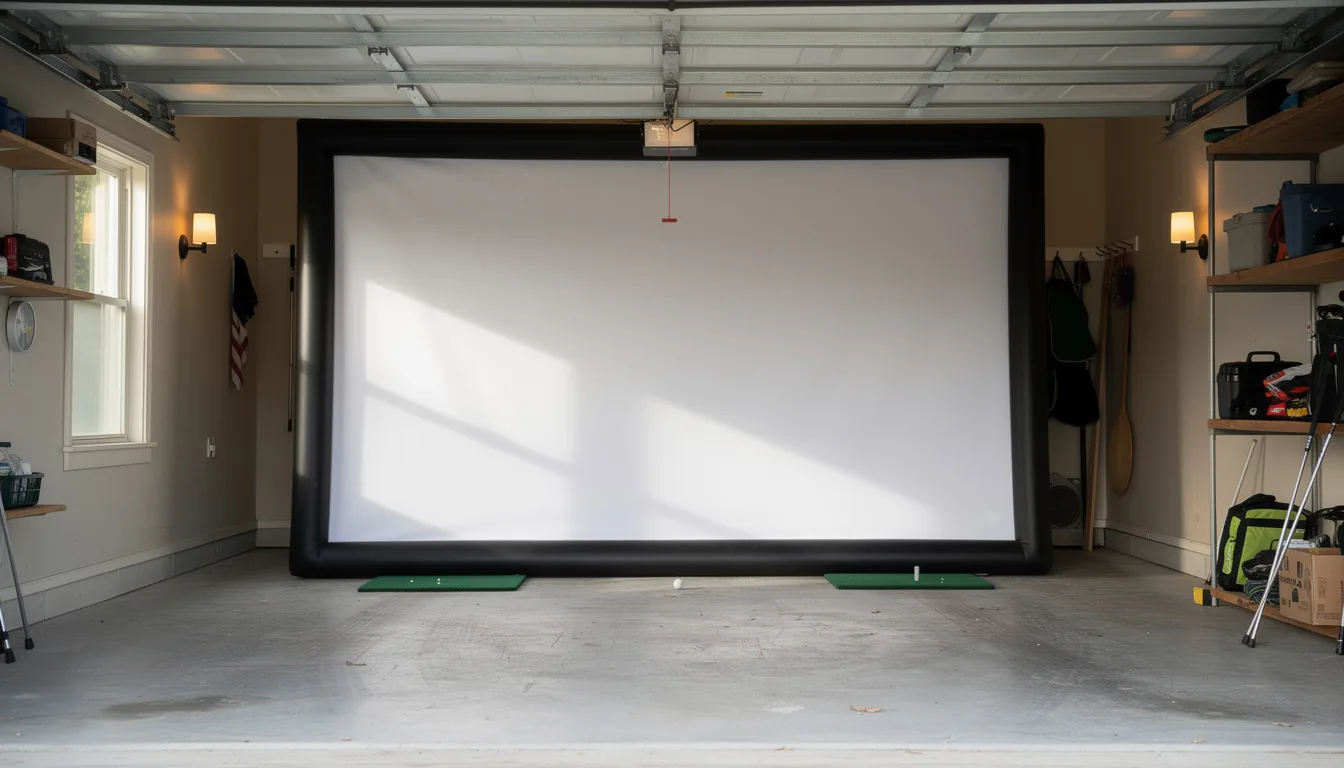
A golf simulator impact screen has to do two jobs at once, stop a ball travelling at highway speed and hold a clean projected image, and it is the mounting tension plus the clearance behind it that decides how well it does either.
This guide is part of Golf Simulator Components: The Full Parts List.
Sections8
- What a Golf Simulator Impact Screen Is Made Of
- White vs Grey: The Contrast Trade
- Screen Shape Decides Your Impact Screen Projector Pairing
- Mounting and Tensioning an Impact Screen
- Screen-to-Wall Clearance and the Memory Foam Trap
- Bounce-Back, Noise and What Sits Underneath
- How Long an Impact Screen Lasts
- Golf Simulator Impact Screen Verdict
A golf simulator impact screen has to stop a ball moving at highway speed and hold a sharp projected image at the same time. Those two jobs pull in opposite directions. Everything about screen design, from the layers to how you hang it, is a compromise between them.
Get the mounting right and a screen lasts years. Get it wrong and you will be shopping again inside a season, because most screens die from bad installation rather than hard hitting.
This page covers what the material actually is, why some screens are grey, how to tension one properly, the clearance it needs behind it, and how to pair it with a projector.
What a Golf Simulator Impact Screen Is Made Of
Modern screens are almost all polyester, built in three layers.
The construction is a sandwich. Two heavy-duty, tight-knit, impact-resistant polyester faces sit on the outside, with a spacer mesh of vertical yarns between them. Carl's Place, SIGPRO, and Elite Sim Golf all build to this pattern. The outer faces take the strike and carry the image. The spacer core absorbs the energy and dampens the sound.
That middle layer is doing most of the work you care about. It is why a triple-layer screen rebounds less, sounds quieter, and holds a flatter surface than a single sheet of fabric.
Ball speed limits tell you the headroom. Carl's Place rates its premium screen for ball speeds up to 250 mph, and Bullseye states its screens are tested above 200 mph. For context, very few amateur golfers exceed 180 mph ball speed with a driver, so a quality screen is not the weak link in your build. The components overview shows where the screen sits in the wider parts list.
Surface smoothness is the other half of the material story. A tighter, smoother knit means less visible texture in the projected image, which is what separates a screen that looks like a display from one that looks like fabric.
White vs Grey: The Contrast Trade
Screen colour is about your room, not your budget.
White screens reflect the most light. They give the brightest image and the punchiest colours, and they are the right pick when you can properly darken the room.
Grey screens absorb some ambient light instead of bouncing it around. That lifts contrast and gives noticeably darker blacks. Carl's Place and SIGPRO both sell high-contrast grey versions, and Indoor Golf Outlet describes its grey screen as the same triple-layer build tuned for light-filled rooms.
The practical test is simple. If your space has windows, a glass door, or a garage door you cannot fully cover, grey will look better. If it is a blacked-out basement, white will look brighter. Light control is mostly an enclosure job, covered on the enclosure page, and the two decisions should be made together.
Screen Shape Decides Your Impact Screen Projector Pairing
This is where builds go wrong, and it happens before anyone buys a projector.
Screens come in two shapes. Square, 1:1 screens are common in home bays, and SIGPRO's 7-foot-7 by 7-foot-7 premium screen is a typical example. Widescreen, 16:9 screens match the native shape of modern 1080p and 4K projectors, which is why Elite Sim Golf builds its Albatross 13S around that format.
Neither is wrong, but the mismatch costs you. Project a 16:9 image onto a 1:1 square screen and you either get black bars top and bottom or you overshoot the sides. Square screens do give more vertical room to catch high shots, which is a real safety gain in a low room, as the ceiling height guide explains.
Two numbers make the pairing work:
- Screen width tells you the image size the projector must fill.
- Mount distance plus that width gives the throw ratio you must shop for.
Cero Golf gives a worked case: a short-throw laser with a throw ratio of 0.69 to 0.83:1 sits roughly 2.4 to 2.9 metres back to fill a 3.5-metre wide image. Sort the screen first, then buy the projector to suit. Once your screen size is settled, compare short-throw golf simulator projectors at Indoor Golf Shop using those two numbers.
Brightness follows shape. aboutGOLF suggests at least 3,000 lumens for most builds, and grey screens want a little more since they absorb light by design.
Mounting and Tensioning an Impact Screen
Screens arrive finished with a mounting edge, and that edge tells you how it wants to be hung.
Carl's Place finishes screens with a 2.5-inch black vinyl border and grommets around the perimeter, with grommets measuring three quarters of an inch outside and three eighths inside. Bullseye spaces grommets every 12 inches. Finishing options usually include a plain classic edge, an edge with flaps, or an edge with loop fastener for Velcro mounting.
Ball bungees through the grommets are the standard method, with 6-inch or 9-inch bungees the common sizes. Zip ties and shock cord also work. Bungees are preferred because they stretch, which is the whole point.
Tension is a balance, not a maximum:
- Too loose and the screen ripples, which distorts the image and lets the fabric slap the frame.
- Too tight and you remove the give that absorbs the ball, which raises bounce-back and wears the screen fast.
- Go for flat and wrinkle-free with the screen still able to move backward on impact.
Some builds run a bungee cord along the bottom instead of a frame crossbar. Elite Sim Golf does this so the screen meets the turf cleanly and there is no rigid bar down low for balls to hit. Foam inserts behind the screen edges, standard on most kits, protect both you and the frame from corner ricochets. To see finished sizes and edge styles side by side, browse golf simulator impact screens at Indoor Golf Shop.
Screen-to-Wall Clearance and the Memory Foam Trap
The gap behind the screen is not wasted space. It is part of how the screen works.
When a ball hits, the screen moves back. That movement is what absorbs the energy. Carl's Place asks for 12 to 16 inches of clearance between the screen and the wall so the fabric has room to travel. Squeeze it against a wall and the ball's energy has nowhere to go, so it goes into the fabric fibres instead.
This is where a popular shortcut backfires. People hang memory foam or weighted blankets behind the screen to quieten impact noise. Shop Indoor Golf warns plainly that if that material touches the screen or sits too close, the strike energy concentrates at the contact point and the screen wears rapidly.
If you want the noise reduction, hang the foam with a real air gap. Rogue Engineer zip-tied a memory foam topper to a board suspended about 6 inches behind his screen rather than resting it against the fabric. That keeps the damping without the wear.
Side clearance matters too. Carl's Place recommends 2 to 3 inches between the frame and the side walls for tensioning and airflow. In tight garages that is often the measurement that decides screen width, which the garage build guide covers in more detail.
Bounce-Back, Noise and What Sits Underneath
Bounce-back is the ball returning toward you after impact. Three things control it.
Screen layers come first, since the spacer core in a triple-layer screen soaks up energy a single layer cannot. Tension comes second, because an over-tight screen behaves like a trampoline. The floor comes third, and it is the one people never think about.
A hard floor in front of the screen lets returning balls skip and roll back at your feet. Foam-backed turf kills that. Gator FIT specifically markets its 5mm foam backing as reducing the bounce and roll of balls returning off the projection screen. The flooring guide covers the surface choices, and it is worth reading before you finalise the screen position.
Noise follows the same logic. Layers and give absorb sound. Hard, tight, and close to a wall is loud.
How Long an Impact Screen Lasts
Screens are not really consumables in the way hitting mats are. A well-mounted screen in a home bay lasts years.
Warranty terms set a floor rather than a lifespan. SIGPRO covers its premium screen for a full year. GolfBays offers nine months on its Pro+ screen and a minimum of six months across its range. Those numbers reflect confidence in the material, not an expected replacement date.
What actually shortens screen lifespan is mostly avoidable:
- Too little clearance behind the screen, so every strike grinds fabric against a hard surface.
- Over-tensioning, which stresses the grommets and the knit at the same time.
- Dirty clubs and balls. Turf residue and rust transfer straight onto the screen, and marks on a projection surface are permanent in practice.
- Handling the face. Screens are white polyester and they stain easily, so mount them by the border.
Wipe your clubface and use clean balls. That single habit does more for screen lifespan than any spec on the box. Onthegreen.golf's build write-up is a useful real-world example of a Carl's Premium screen paired with a short-throw Optoma projector in a home room.
For how the screen fits into the wider spend, the cost guide covers budget planning, and the kit page covers packages where the screen and frame arrive matched. If the room cannot take a screen at all, the net build page is the alternative, and the room size guide will tell you which camp you are in.
Golf Simulator Impact Screen Verdict
A golf simulator impact screen is the piece that makes a build look like a simulator, and it is far more forgiving of hard hitting than of careless mounting. Pick triple-layer polyester, choose grey if you cannot control the light, and match the screen shape to the projector before you buy either.
Then give it room. Twelve to sixteen inches behind, a couple of inches at the sides, and bungee tension that leaves the fabric free to move. Do that and the screen will outlast almost everything else in the bay.
Quick answers
What is a golf simulator impact screen made of?
Most quality screens use three layers: two tight-knit, impact-resistant polyester faces with a spacer mesh between them. The outer faces take the strike and hold the image, while the spacer layer soaks up energy and cuts noise. That sandwich is why triple-layer screens rebound less than single-layer fabric.
Should I get a white or grey impact screen?
Grey screens give darker blacks and better contrast, which helps in rooms with ambient light from windows or a garage door. White screens are brighter and suit fully darkened rooms. If you cannot black out the space, grey is usually the better match.
How much space do you need behind an impact screen?
Carl's Place asks for 12 to 16 inches of clearance between the screen and the wall. That gap gives the ball's energy somewhere to go as the screen moves back on impact. Pushing a screen flat against a wall causes fast wear and sends more balls back at you.
How do you tension a golf simulator impact screen?
Ball bungees through the screen's grommets are the standard method, sometimes with zip ties or shock cord. You want it flat and wrinkle-free but still able to give on impact. Over-tightening a screen removes the give that absorbs the ball and shortens the screen's lifespan.
How long does a golf simulator impact screen last?
Years of home use is normal when the screen is mounted with the right tension and clearance. Warranty terms give a floor rather than a lifespan: SIGPRO covers its premium screen for a year and GolfBays offers nine months on its Pro+. Poor mounting, not ball speed, is what kills screens early.